
Whether you’re staring at a used phone with all identifying stickers removed, helping a friend determine their device’s specifications, or just trying to figure out what phone model you’ve been using for years, identifying a mobile phone’s model can seem deceptively simple. In reality, manufacturers don’t always put model numbers in plain sight, and visual similarities across different generations can be confusing. Fortunately, through a combination of physical inspection, software queries, and online resources, you can usually determine exactly what phone you’re holding.
TL;DR
If you’re trying to identify a phone model, start by checking in the settings under About Phone—this usually reveals the model name or number. You can also look for labels under the battery (for older phones), use IMEI lookup tools, or identify the phone using visual design cues and camera layout. For phones without obvious markings or internal access, third-party apps and websites can help confirm the model. Accurate identification is crucial when selling, repairing, or troubleshooting a device.
How to Identify a Phone Model: A Step-by-Step Breakdown
1. Check in the Phone’s Settings Menu
Modern smartphones typically include all relevant identification info within the device’s software. Here’s how to find it:
- Open the Settings app.
- Scroll down to About Phone or System and then About Device.
- Look for fields labeled Model Number, Device Name, or Hardware Info.
This method usually suffices for common smartphones. For instance, an entry might read Galaxy S21 Ultra or iPhone 13 Pro Max, alongside a more specific model number like SM-G998U or A2484.
2. Inspect the Exterior of the Device
In many cases, design features alone can narrow your search considerably. Manufacturers often follow distinctive visual elements, such as:
- Camera layout: Does it have a single lens, dual, or triple cameras?
- Back panel branding: Look for logos like Samsung, Apple, Huawei, or OnePlus.
- Button placement: Location of volume and power buttons can be brand-specific.
- Charging port type: Is it USB-C, Lightning, or Micro-USB?
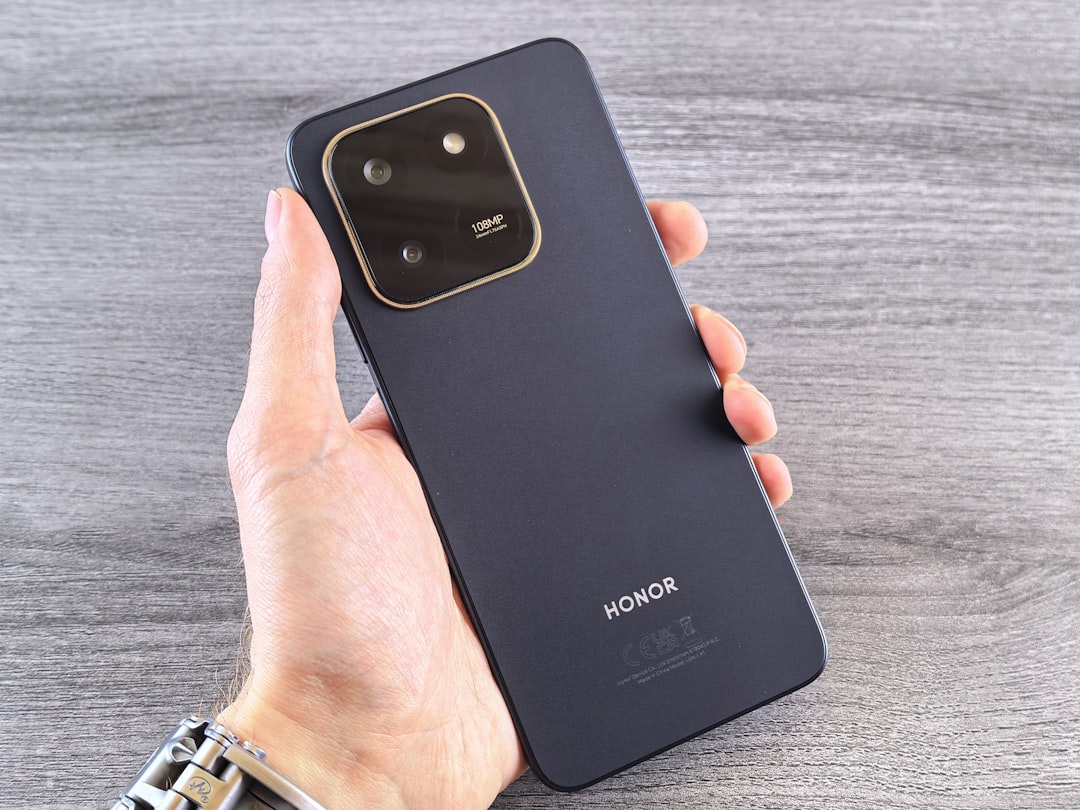
This step is especially useful for identifying the brand, if not the exact model. From there, online resources can help confirm the phone based on visual characteristics.
3. Use IMEI or Serial Number Lookup Tools
Every phone comes with a unique identifier called an IMEI (International Mobile Equipment Identity). Here’s how to obtain and use it:
- Dial *#06# on your phone. This command reveals the IMEI instantly.
- Alternatively, go to Settings > About Phone > Status.
- Copy the IMEI and enter it into a reputable IMEI lookup site or contact the manufacturer.
Results usually include model name, manufacturing date, carrier lock status, and other identifiers. This method is especially helpful when buying or selling a secondhand device.
4. Check Beneath the Battery (Older Phones)
For older Android and feature phones with removable batteries, take a look underneath:
- Turn off the phone and remove the back cover.
- Take out the battery carefully.
- Details such as the model number, IMEI, FCC ID, and more will likely be printed on a label inside.
Labels such as Model: SM-J260G or IMEI: 359794080019642 can then be searched online to retrieve more information about that device.
5. Use Third-Party Apps for Identification
If the built-in system information is limited or unclear, many apps are designed to analyze your phone and report technical specifications:
- CPU-Z (Android)
- Phone INFO (Samsung-specific)
- Device Info HW
These apps can provide manufacturer details, screen size, resolution, chipset info, and model number—helpful for diagnosing issues or confirming compatibility with accessories.
6. Use Visual Search on Google or Apple
If you don’t have access to the operating system or can’t find serial numbers, a visual search might help:
- Take a high-quality photo of the phone’s front and back.
- Search Google with an image upload or use Google Lens on Android and iOS.
- Scroll through visually similar matches until you find the correct model.
Helpful especially when dealing with unbranded or foreign-market devices.
7. Use Manufacturer or Carrier Resources
If the phone is tied to a specific provider or OEM, contact them directly. They often maintain databases of models by serial number or IMEI. Apple users, for example, can use their Apple ID portal to find registered devices, while Samsung offers Smart Switch or Samsung Members apps.
Why Model Identification Matters
Understanding exactly which smartphone model you’re handling isn’t just for tech hobbyists. It has several practical implications:
- Firmware & OS updates: Software updates are typically model-specific. Installing a ROM intended for a different variant could cause serious issues.
- Accessory compatibility: Phone cases, screen protectors, and chargers vary greatly between models—even within the same brand.
- Resale value: Accurate listings avoid disputes and can increase buyer trust dramatically.
- Warranty claims & repairs: Service centers require exact model info for parts replacement and diagnostics.
Common Examples of Confused Models
Some smartphone models appear deceptively similar. Here are a few common cases of confusion:
- iPhone XR vs. iPhone 11: Both have similar size and design, but the iPhone 11 has dual rear cameras.
- Samsung Galaxy S20 vs. Galaxy S20 FE: The S20 FE is slightly larger and uses different materials.
- Google Pixel 6 vs. Pixel 6a: These phones share the same design aesthetic but differ in size and specs.
That’s why having access to the model number or IMEI is often more reliable than relying on appearance alone.
Tips When Buying or Selling a Used Phone
If you’re identifying a model for resale purposes or purchasing a secondhand device, here are a few additional precautions:
- Always request or provide the model number and IMEI before the transaction.
- Use an escrow service or meet in a safe, public space.
- Check that the operating system boots properly and matches the stated model.
- Make sure the phone is not carrier-locked or blacklisted.
It’s easy to misrepresent or misunderstand a phone’s features without accurate identification. Trustworthy dealing begins with transparency.
Conclusion
Identifying a smartphone model isn’t just about curiosity—it’s about ensuring compatibility, value, and safety. Whether you’re dealing with a known model or a mysterious device, tools like settings information, IMEI lookups, third-party apps, and visual searches can provide the answers you need. With a few minutes of investigation, you can confidently answer the question: What kind of phone is this?
As smartphones continue to evolve, model identification will remain a key step in responsible ownership, trade, and support.